The best way to organize receipts for your small business
Key Takeaways
A receipt captured within ten seconds of a purchase tends to get saved; one left for later almost always ends up lost, faded, or forgotten.
Forwarding digital receipts to a dedicated capture-app email address removes the manual upload step entirely for recurring subscriptions and online purchases.
Expense categories that mirror the chart of accounts eliminate a translation step later and keep bookkeeping and expense records speaking the same language.
A missing business purpose is the most common documentation gap; "client meeting to discuss Q3 scope" holds up far better than "lunch."
A receipt management app that syncs directly with accounting software matches receipts to bank transactions automatically, eliminating manual reconciliation.
The upfront setup for a working receipt system is small, and the ongoing per-expense effort is even smaller once the habit sticks.
The best way to organize receipts for a small business
Quick Answer
Organizing receipts for a small business comes down to three habits: capturing every receipt within seconds of purchase using a scanning app or email forwarding, categorizing consistently to match the chart of accounts with a real business purpose attached, and syncing that capture tool directly into accounting software so receipts attach to transactions automatically. The specific app matters far less than whether the system actually gets used consistently over time.
Keeping receipts matters, and most business owners know it. They matter for taxes, expense reports, and financial records. And yet, somehow, they end up crumpled in jacket pockets, buried in email threads, and scattered across desk drawers like confetti from a party nobody wanted to attend.
Then April arrives, or an accountant asks for documentation, or last month's credit card statement needs reconciling. Suddenly it is a hunt through old emails, coat pockets, and the question of why that $847 charge from three months ago has no supporting record anywhere.
This is not a discipline problem. It is a system problem. The business owners who successfully manage small business receipts are not inherently more organized. They have a system that captures receipts before they disappear and keeps them accessible without ongoing effort.
Here is how to build that system.
How should receipts actually get captured before they disappear?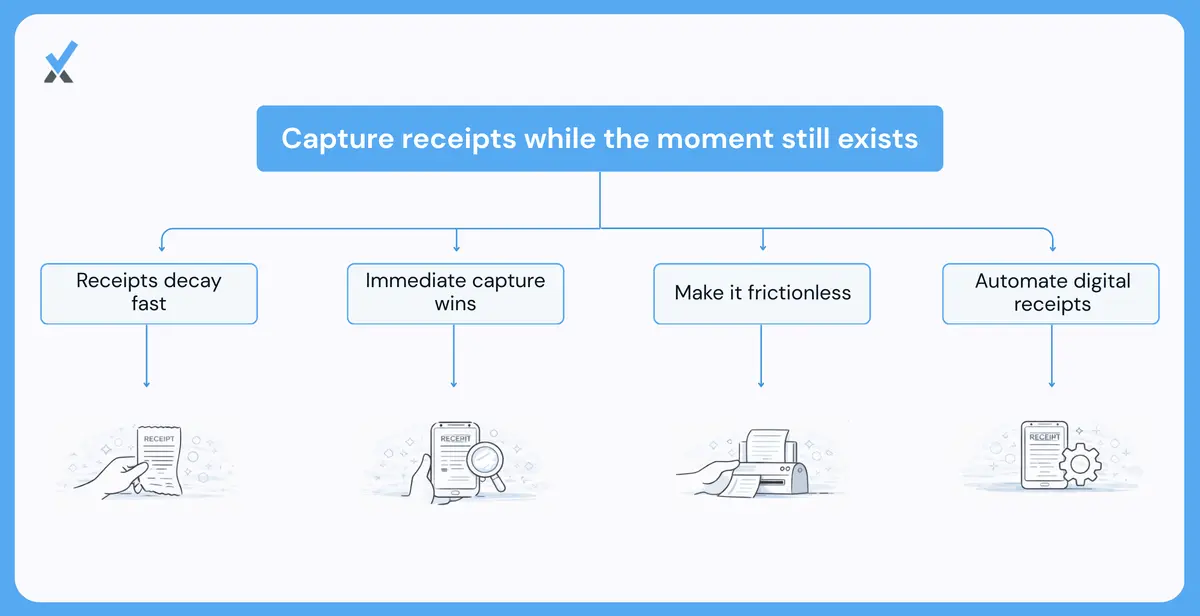
The single most important principle in expense documentation is this: capture the receipt at the moment of purchase, or accept that it probably never happens.
Receipts have a half-life measured in hours. A paper receipt goes into a wallet after lunch. By the time a desk is reached, attention has moved on to other things. By next week, that receipt is either lost, illegible, or completely forgotten. Digital receipts fare slightly better, but email inboxes are where receipts go to disappear among hundreds of other messages.
-
Receipt scanning apps solve the paper problem. Tools like Expensify, Dext, Zoho Expense, and QuickBooks' built-in receipt capture allow a receipt to be photographed immediately after the transaction. The app automatically extracts the vendor name, amount, and date. The paper receipt can go in the trash because the data now lives in the system.
The key is making capture effortless. Receipts that need to be remembered and uploaded later do not get uploaded consistently. A photo snapped within 10 seconds of paying for something is what makes the habit stick.
-
Email forwarding captures digital receipts. Most receipt management apps provide a dedicated email address for forwarding. Software bought online? Forward the confirmation email. A subscription renewed? Forward the invoice. The receipt is entered into the system without any additional steps.
Setting up an email filter that automatically forwards receipts from common vendors to the capture system removes even the manual forwarding step for recurring expenses.
-
The moment of purchase is the only reliable window. Every hour that passes after an expense is made, capture becomes less likely. Building the habit of capturing receipts immediately makes the downstream problems disappear. Wait until later, and it is back to hunting through pockets and email archives.
How should receipts get organized with consistent categorization?
Capturing receipts is only useful if they can be found later. A shoebox full of paper receipts is technically "organized" in the sense that they are all in one place. But it fails the only test that matters: can a specific receipt be located in under sixty seconds?
-
Categories should mirror the chart of accounts. When an expense gets categorized as "Travel," "Software," or "Professional Services," using the same categories that appear in the accounting system eliminates the need for translation later and ensures expense documentation speaks the same language as the books.
Most receipt management apps allow custom categories. Taking 15 minutes to set them up correctly at the beginning means every receipt captured from then on automatically slots into the right bucket.
-
Metadata makes receipts searchable. The minimum information attached to every receipt should include vendor name, amount, date, and business purpose. The business purpose matters most for tax documentation. "Lunch" is not a business purpose. "Client meeting with ABC Company to discuss Q3 project scope" is.
Better expense-tracking systems automatically capture vendor and amount through OCR (optical character recognition). Adding the business purpose manually takes five seconds if done immediately and five minutes if left to memory later.
-
Searchable beats hierarchical. Old-school receipt organization involved folders: one folder per month, or one per expense category, or some elaborate hierarchy. This works until a receipt could be in multiple folders, or until the folder system becomes so complex that filing takes longer than searching.
Modern receipt management apps are searchable. Typing "Delta" surfaces every airline receipt. Typing "November" surfaces everything from that month. Typing "software" surfaces all subscriptions. The structure exists in metadata, not in folder trees that need maintaining.
How does integrating with an accounting system eliminate double entry?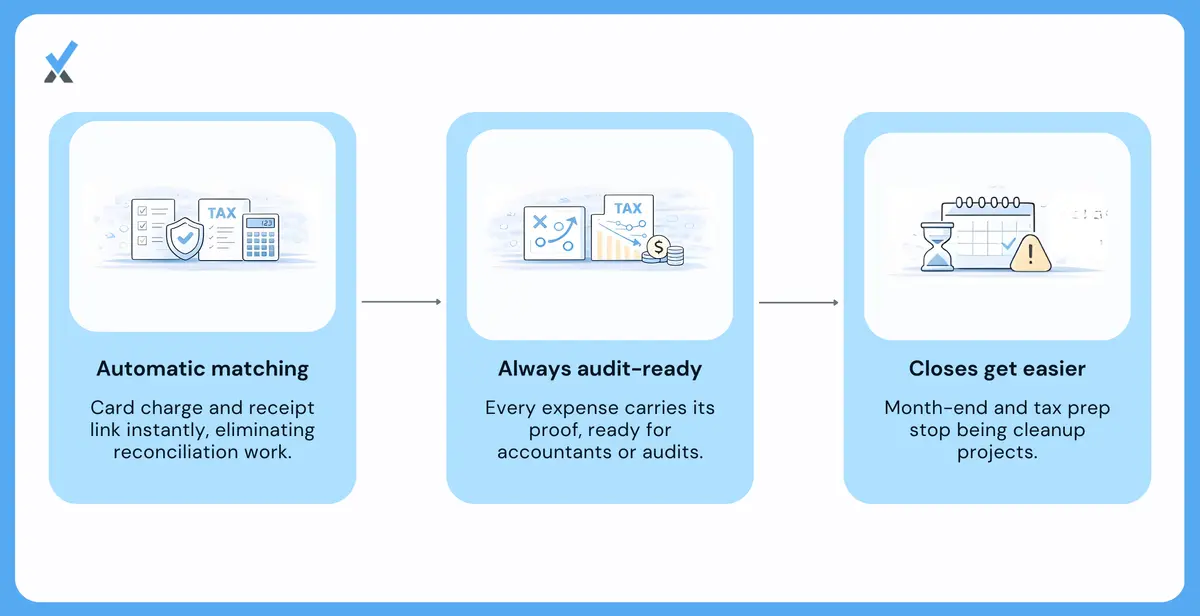
The final step is making receipts flow into the books without manual re-entry. Capturing and organizing receipts is valuable on its own, but the real time savings come from integration.
-
Direct sync eliminates reconciliation headaches. When a receipt management app connects to QuickBooks, Xero, or an accounting platform, captured receipts can match automatically to bank transactions. Lunch gets paid for with a business card. A photo of the receipt gets snapped. The expense syncs to the accounting system and attaches to the matching credit card transaction.
No more printing receipts and stapling them to expense reports. No more manually entering data from receipt images into spreadsheets. No more reconciling credit card statements line by line.
-
Receipts attach to transactions automatically. In a well-integrated expense-tracking system, every transaction in accounting software has its corresponding receipt attached. When an accountant asks for documentation or the IRS requests records, everything is already connected. The receipt lives with the expense it supports.
-
Books stay audit-ready without extra work. The combination of immediate capture, proper categorization, and accounting integration ensures expense documentation is always up to date. Month-end close does not require a receipt reconciliation sprint. Tax preparation does not require archaeological excavation of an email inbox.
This is what separates a receipt organizer for a small business from a pile of good intentions. The system does the work that manual processes cannot sustain.
Does the specific tool matter more than the system?
Dozens of apps promise to solve receipt chaos. Expensify, Dext, Zoho Expense, Shoeboxed, Wave, and the built-in tools from QuickBooks and Xero all handle the basics. The differences between them matter less than whether the chosen tool actually gets used.
Picking a tool that integrates with the accounting system, setting it up so capture requires minimal friction, using categories that match the chart of accounts, and building the habit of capturing receipts as soon as possible matters more than which specific app gets chosen.
The business owners who spend hours chasing down expense documentation are not using inferior tools. They are using no system at all, or a system that requires too much manual effort to sustain.
The best receipt management app is the one that actually gets used consistently. And consistency comes from reducing friction at every step.
Why should receipts not get treated as a problem to solve later?
Receipt organization is not interesting. Nobody starts a business because they are excited about expense documentation. But the time spent managing receipts poorly is time that could go toward work that actually matters.
A functional system takes thirty minutes to set up and thirty seconds per expense to maintain. A broken system takes hours to clean up each quarter and creates stress whenever someone asks for documentation.
The choice is not between organized and disorganized. It is between a small investment now and a much larger investment later.
Build the system once. Capture receipts immediately. Let the integration, run with an expert-led, AI-powered, human-in-the-loop process where it matters, do the rest.
| Capture method | Typical outcome | Effort required |
|---|---|---|
| Saved for later | Often lost, faded, or forgotten | None now, high effort later |
| Photo at point of purchase | Preserved reliably | About 10 seconds |
| Email forwarding | Captured automatically | Near zero once set up |
How long should receipts actually be kept for tax purposes?
The IRS generally recommends keeping supporting records for at least three years from the filing date, though certain situations, such as underreported income or a bad debt deduction, extend that to six or seven years. Digital storage makes the retention period far less painful to manage than a physical shoebox ever could.
Do digital photos of receipts satisfy IRS documentation requirements?
Yes, the IRS accepts digital copies as long as the image is legible and includes the same key details a paper receipt would: vendor, date, amount, and what was purchased. The original paper version does not need to be kept once a clear digital copy exists in the system.
What should happen to receipts under a certain dollar amount?
There is no blanket exemption for small purchases, though some internal expense policies set a threshold, often $25 to $75, below which documentation gets handled more loosely. For anything claimed as a tax deduction, capturing the receipt regardless of size is the safer default.
A small investment now beats a much larger one later. Build the system once, and let it run itself.
See how Numetix accounting services keep receipts and books connected automatically, for professional services firms specifically.
Numetix is an AI-first accounting firm. AI runs the bookkeeping, tax, payroll, and reporting workflow. Industry experts handle the judgment, month-end close, review, and advisory. We serve founder-led service firms across law, consulting, IT, healthcare, creative, and nonprofit. Headquartered in California, serving clients nationwide.
Suggested Readings
What CO-197 denial code means (authorization absent)
What CO-50 denial code means (medical necessity)
Cause marketing and commercial co-ventures explained
See what Numetix can do for you
Learn how the Numetix Portal streamlines communication, offers valuable insights, and saves you time so you can focus on growing your business.