The expense automation software that stops consultant travel receipts from piling up at month-end
Key Takeaways
A ten-hour month-end expense reconciliation task typically shrinks to about two hours once receipts stop arriving in one chaotic batch.
Receipts photographed immediately at the point of purchase preserve context and image quality that fade within weeks once they sit in a pocket or hot car.
Modern OCR extracts vendor, date, amount, and payment method from a receipt correctly 85 to 95 percent of the time, leaving only real exceptions for review.
Corporate card charges get matched automatically against submitted receipts through bank feeds, so most expenses are already reconciled before anyone reviews them.
Expense policy violations should get flagged at the moment of submission, not weeks later during month-end close when fixing them is far more disruptive.
A standalone expense tool that still requires manual export and import into accounting or time-tracking systems creates new work instead of eliminating it.
The expense automation software that stops consultant travel receipts from piling up at month-end
Quick Answer
Expense automation software replaces the month-end receipt pile-up with continuous processing: receipts get captured by mobile app at purchase, OCR extracts vendor, date, and amount automatically, and card feeds match charges to receipts in real time. What used to be roughly 10 hours of reconciliation work concentrated into a few chaotic days becomes about 2 hours of reviewing genuine exceptions, spread across the month instead of piling up at close.
It is the first week of the month. The office manager has a shoebox on her desk. Actually, it is a pile of envelopes, crumpled receipts, and forwarded emails from six consultants who traveled last month. Her job for the next two days is to make sense of it all.
She matches faded hotel receipts to credit card charges. She emails consultants asking what the $47 charge at an airport restaurant was for. She makes educated guesses about project coding for expenses that no one has labeled. By the time everything reconciles, she has spent 10 hours on work that should have taken 2.
This is how travel expense management works at most consulting firms. Receipts accumulate throughout the month, then dump into a single painful processing window. Expense automation software exists to eliminate this pattern.
Why does manual travel expense processing create predictable month-end chaos?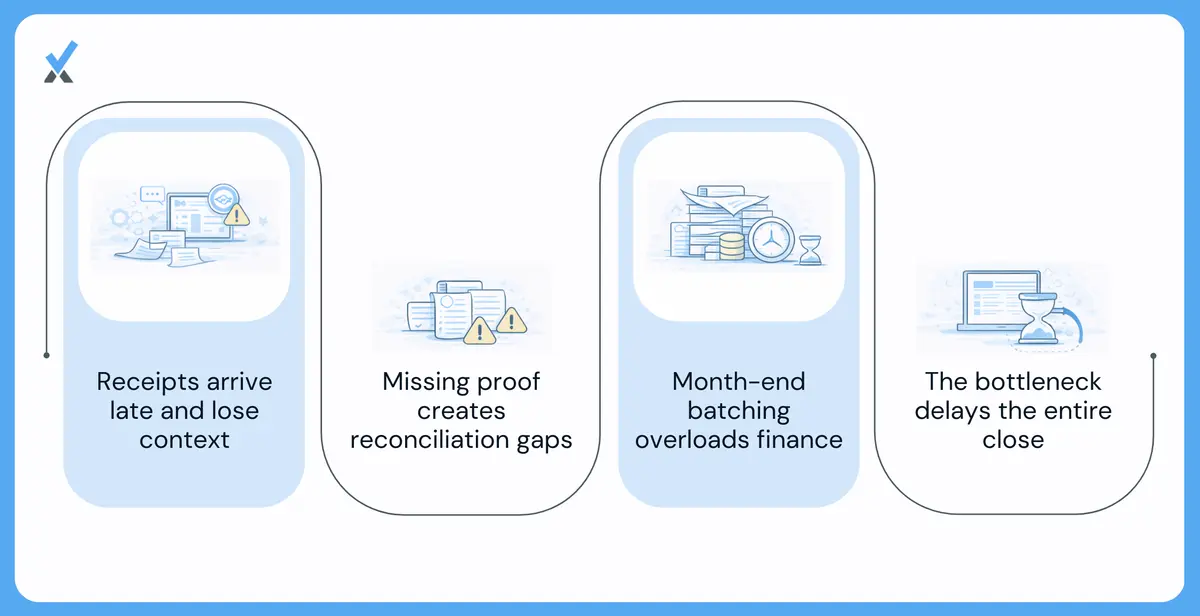
The problems with manual T&E expense processing are not random. They follow predictable patterns that repeat every single month.
-
Delayed receipt submission causes reconciliation problems. Consultants are focused on client work during travel, not on administrative tasks. Receipts go into pockets, bags, and laptop cases. Some get photographed with the intention of submitting later. Most sit until someone asks for them.
By the time receipts arrive at month-end, the context is gone. The consultant cannot remember which client the dinner was with or why the rental car was upgraded. The receipt that was clear two weeks ago is now faded from sitting in a hot car. The connection between the expense and its business purpose has evaporated.
-
Missing and illegible receipts create documentation gaps. Not every receipt survives. Paper receipts get lost, damaged, or accidentally thrown away. Email receipts get buried in inboxes. Some transactions never generate receipts that consultants think to save.
During reconciliation, credit card charges appear without corresponding documentation. The $85 charge at a restaurant has no receipt. The $12 parking fee is not recorded. Someone has to chase down explanations or decide whether to process the expense without proper backup.
-
Batch processing at month-end overwhelms resources. When a month's worth of expenses falls due in a single week, whoever processes them faces an impossible workload. Ten consultants with 20 expenses each means 200 transactions to review, match, code, and reconcile. The work that should spread across the month is concentrated into a few chaotic days.
This batch processing delays the month-end close. Books cannot be finalized until expenses are processed. Financials cannot be published until the books close. The travel expense reconciliation bottleneck cascades through the entire close process.
How does automation shift expense processing from batch to continuous?
Expense automation software changes the fundamental timing of expense processing. Instead of batching everything at month-end, expenses flow through continuously as they occur.
-
Mobile capture at the point of transaction. Modern automated expense tracking starts at the moment of purchase. The consultant photographs the receipt immediately using a mobile app. The expense is entered into the system while the consultant is still at the restaurant or hotel, when the context is fresh and the receipt is pristine.
Some systems also accept receipts forwarded via email. The hotel confirmation, the airline itinerary, and the rideshare receipt can all be forwarded directly to an expense processing address, no manual upload required.
The discipline of capturing immediately is easier than the discipline of remembering to submit later. The receipt that goes into the system at 7 pm on Tuesday does not end up in a pile dumped on someone's desk three weeks later.
-
OCR extraction eliminates manual data entry. Once a receipt image is entered into the system, optical character recognition extracts the relevant data: vendor name, date, amount, and payment method. This extraction happens automatically, not through someone manually typing numbers from a photograph.
OCR accuracy has improved dramatically in recent years. Modern systems correctly extract data from receipts 85% to 95% of the time, and the remaining exceptions are flagged for human review rather than requiring human entry for every transaction.
-
Automatic categorization and project coding. Expense automation software learns categorization patterns. Hotel chain receipts are categorized as lodging. Airline receipts are categorized as airfare. The system applies these rules automatically based on vendor recognition.
Project coding can follow similar patterns. If a consultant consistently bills travel on a specific project, new travel expenses can default to that project. If a trip was pre-approved with specified project codes, those codes can automatically apply to all expenses within the trip dates.
-
Real-time reconciliation against card feeds. Corporate card transactions flow into the expense system through bank feeds. As receipts arrive, they are automatically matched to corresponding card charges. The $247.83 hotel charge on the card matches the $247.83 receipt that was photographed at checkout.
This matching happens continuously, not at month-end. When someone reviews expenses, most are already reconciled. Only the exceptions require attention: receipts without matching charges, charges without matching receipts, and amounts that do not agree.
What capabilities actually matter when evaluating expense automation software?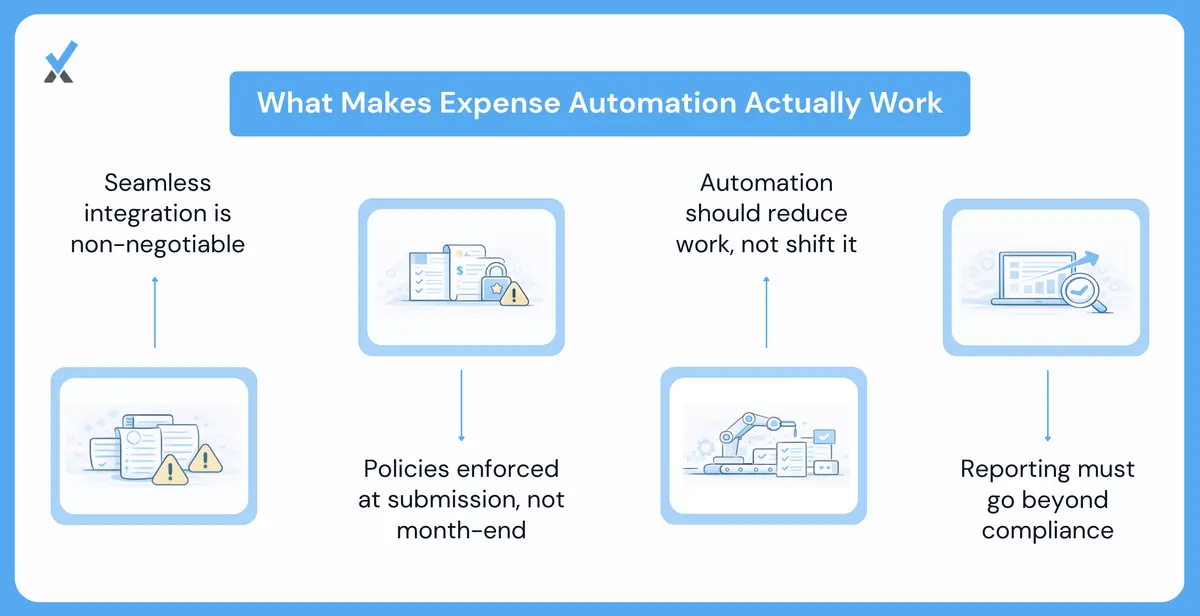
Not all expense automation software delivers equal value. When evaluating solutions, specific capabilities determine whether the system actually eliminates month-end pain or moves it.
-
Integration with existing accounting and time-tracking systems. Expense data needs to flow into the general ledger for financial reporting and, potentially, into the time-tracking system for project profitability analysis. A standalone expense tool that requires manual export and import creates new work rather than eliminating it.
Look for native integrations with QuickBooks, Xero, or the accounting platform in use, and the ability to sync project codes with time-tracking or project-management tools. The goal is expense data flowing through the finance stack without manual intervention.
-
Flexible policy enforcement prevents downstream problems. Expense policies vary by firm, by project, and sometimes by client. Some clients allow first-class travel. Others cap hotel rates. Some projects include meal per diems. Others reimburse actuals.
Effective expense automation enforces these policies at submission time, not at review time. A receipt that violates policy flags immediately for the consultant to address, not weeks later when someone is trying to close the books. Policy exceptions route for approval rather than creating reconciliation problems.
-
Reporting should support both compliance and analytics. Basic compliance reporting shows expenses by category, by employee, and by project. This supports reimbursement, client billing, and tax documentation.
Analytics reporting goes further: travel spending trends over time, average trip costs by destination, policy violation rates by team. These insights help optimize travel programs and identify cost-reduction opportunities beyond simply processing expenses efficiently.
Is the month-end pile-up really inevitable?
Consultant travel generates expenses. Those expenses require capture, categorization, and reconciliation. This work does not disappear with automation.
What disappears is the pile-up. Expenses captured at the point of transaction do not accumulate into month-end chaos. Receipts extracted by OCR do not require manual data entry. Transactions matched against card feeds do not require forensic reconciliation.
The 10 hours an office manager spends each month on travel expense management could be reduced to 2 hours of exception review. The month-end close that waits for expense processing can proceed without that bottleneck. Consultants who dump crumpled receipts on someone's desk can instead spend 30 seconds photographing each receipt as it happens.
Expense automation software is a mature technology, run well with the same expert-led, AI-powered, human-in-the-loop discipline as the rest of the books. Firms still processing travel expenses manually are choosing to accept a problem that has an available solution. The pile-up that arrives every month-end is not a fact of life. It is a process waiting to be automated.
| Stage | Manual processing | Automated processing |
|---|---|---|
| Receipt capture | Saved for later, often lost or faded | Photographed instantly via mobile app |
| Data entry | Manually typed at month-end | OCR-extracted automatically, 85 to 95 percent accurate |
| Reconciliation | Manual matching against card statements | Automatic matching via bank feeds |
| Policy checks | Discovered weeks later at close | Flagged at submission time |
| Monthly time cost | Roughly 10 hours, concentrated | Roughly 2 hours, spread across the month |
How long does it take a team to adopt mobile receipt capture consistently?
Most teams reach consistent habits within 30 to 60 days, especially once the alternative, digging through pockets and inboxes at month-end, becomes visibly more painful than a 30-second photo. Making capture the path of least resistance, rather than mandating it through policy alone, speeds up adoption considerably.
What happens to expenses that genuinely have no receipt?
Most policies allow a documented exception process for small amounts below a set threshold, with a written explanation substituting for the missing receipt. Anything above that threshold typically needs manager approval and, depending on the amount, may not be reimbursable without proper documentation for tax purposes.
Does expense automation work for cash transactions, not just card charges?
Yes, though the matching process differs. Cash expenses still get captured via mobile receipt photo and OCR extraction, but since there is no corresponding card feed to match against, they typically route straight to manual review rather than being auto-reconciled.
The pile-up is not a fact of life. It is a process waiting to be automated, one receipt at a time instead of all at once.
See how Numetix accounting services handle travel expense automation, built for professional services firms specifically.
Numetix is an AI-first accounting firm. AI runs the bookkeeping, tax, payroll, and reporting workflow. Industry experts handle the judgment, month-end close, review, and advisory. We serve founder-led service firms across law, consulting, IT, healthcare, creative, and nonprofit. Headquartered in California, serving clients nationwide.
Suggested Readings
AppFolio accounting: Best practices for 200+ door PM companies
AppFolio and QuickBooks don’t sync: Here’s how PM firms fix it
Best property management accounting software for growing PM firms
See what Numetix can do for you
Learn how the Numetix Portal streamlines communication, offers valuable insights, and saves you time so you can focus on growing your business.